

Appearance
Model Serving
prokube exposes KServe for deploying and scaling machine learning models as inference endpoints in your workspace.
KServe documentation
Upstream references:
When to Use Model Serving
Use KServe InferenceServices when a trained model should be available as an API endpoint:
- serve models trained or tracked in the same workspace;
- deploy models from S3-compatible file storage or from the MLflow model registry;
- scale inference replicas automatically based on request concurrency, QPS, or custom metrics;
- test model behaviour interactively before integrating into production;
- use the v2 inference protocol for framework-agnostic model access;
- expose endpoints for external applications through Agent Gateway with API key authentication.
Use Labs or Pipelines for training and exporting models. Move to Model Serving when the model should become a reachable endpoint.
This page covers classic KServe model serving: deploying sklearn, PyTorch, MLflow, and similar models as inference endpoints. For LLM-focused serving (vLLM and HuggingFace runtimes with OpenAI-compatible APIs), see LLM Serving – large language models follow a different operational pattern and are documented separately there.
Get Started
The simplest way to get started is to train a small model in a Lab, upload it to the workspace S3 bucket, and deploy it – all from a notebook cell or Python script.
1) Train and upload a model
Open a JupyterLab or VS Code Lab in your workspace and run this cell:
python
import joblib
from sklearn import datasets, svm
import s3fs

iris = datasets.load_iris()
model = svm.SVC().fit(iris.data, iris.target)
joblib.dump(model, "model.joblib")

namespace = open("/var/run/secrets/kubernetes.io/serviceaccount/namespace").read().strip()  # for automation only
bucket = f"{namespace}-data"
s3_path = f"{bucket}/models/iris"

s3 = s3fs.S3FileSystem()
s3.put("model.joblib", f"{s3_path}/model.joblib")
print(f"Uploaded to s3://{s3_path}")
2) Create the InferenceService
Open the Models page, click Deploy Model, and use the Form tab:
- Model Name –
sklearn-iris. - Framework – select Scikit-learn.
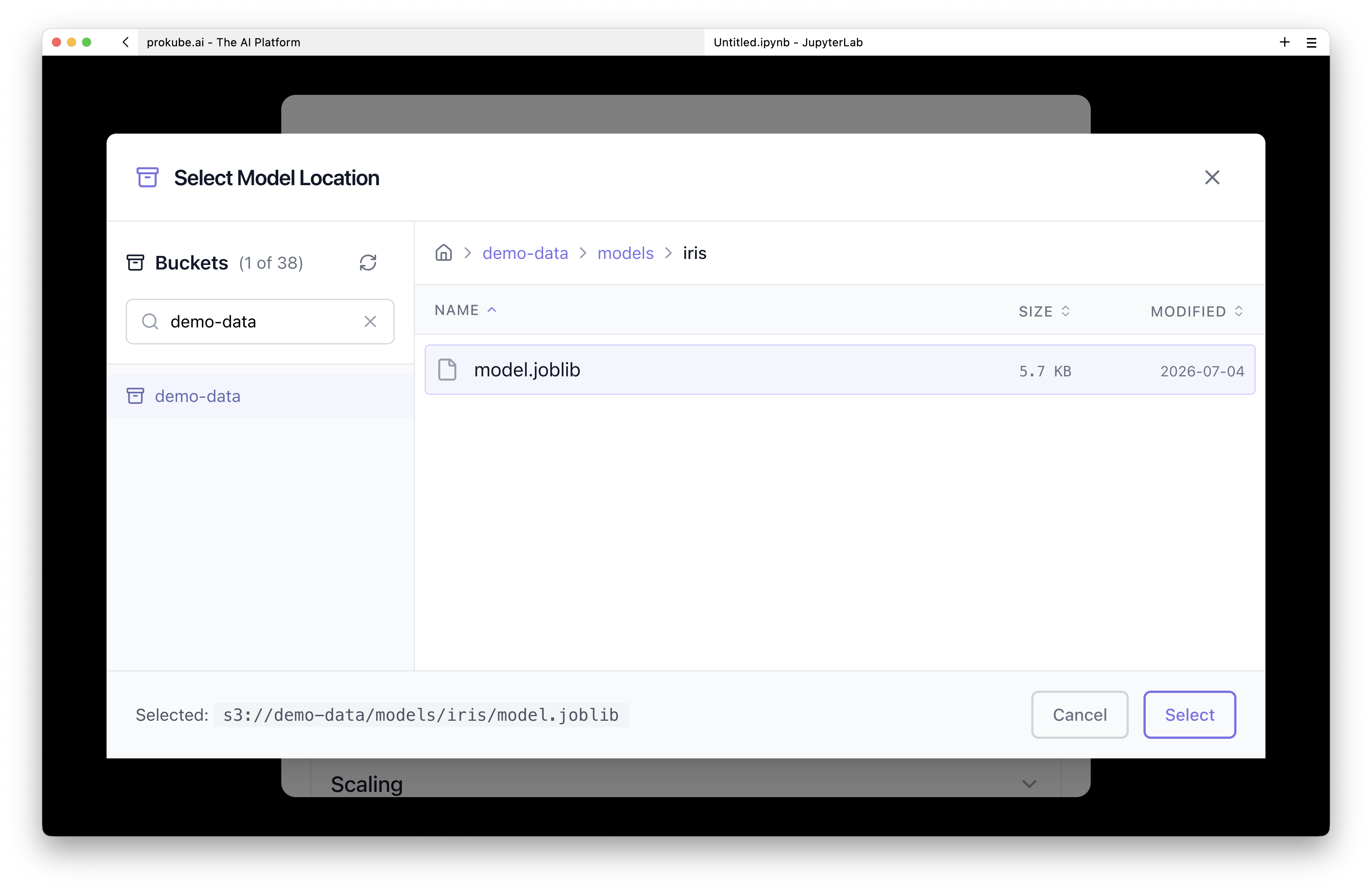
- Storage URI – pick the
models/irisdirectory using Browse S3 or type the exact path from the script output (s3://<namespace>-data/models/iris).
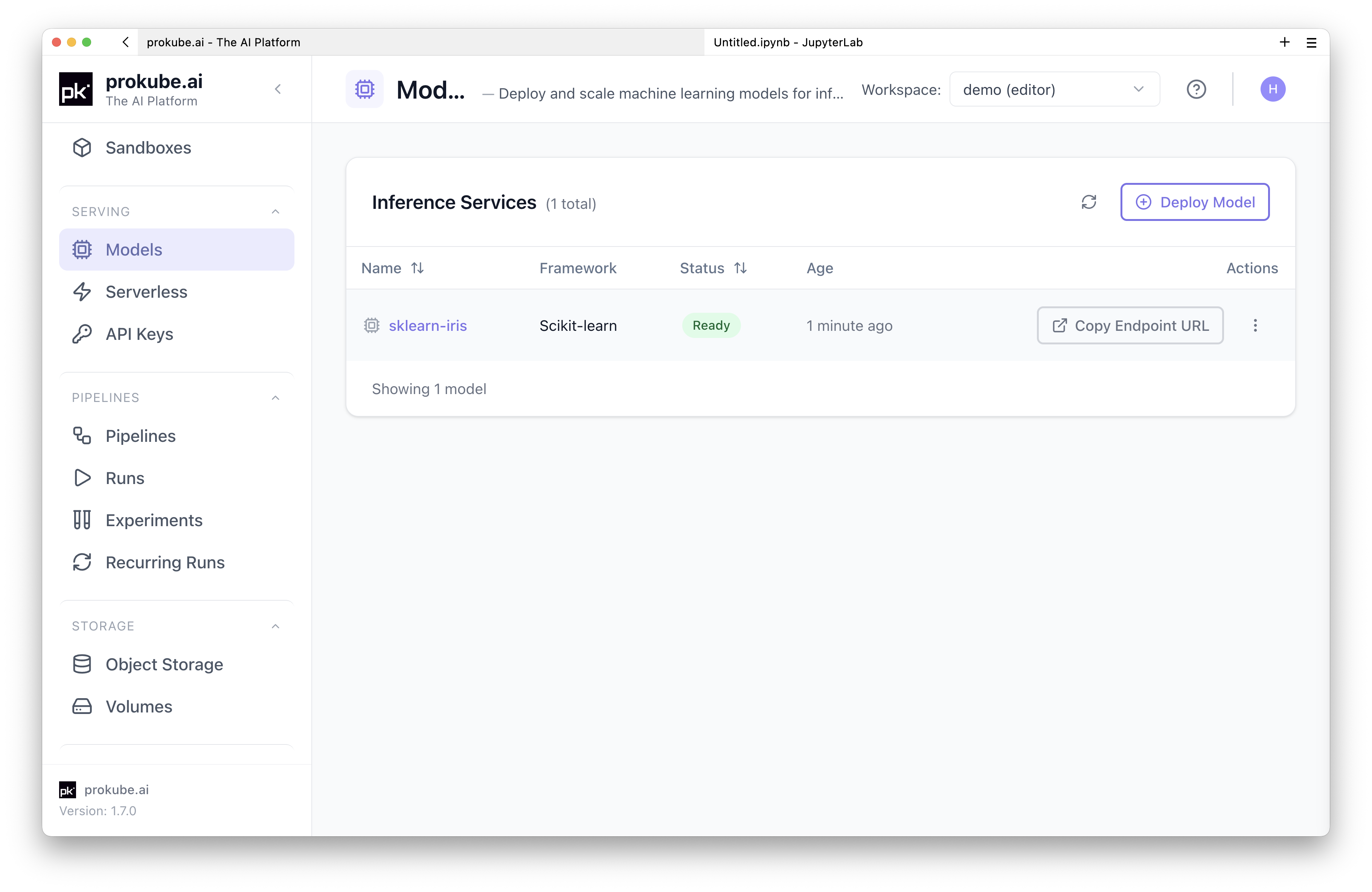
Click Deploy Model. Once deployed, you will find a new entry in the model list. It will take a minute or two for the model to become ready.
3) Test the endpoint
Open the model detail page and switch to the Test tab. Select V1 protocol and send sample data:
json
{
  "instances": [[5.1, 3.5, 1.4, 0.2], [6.8, 2.8, 4.8, 1.4]]
}
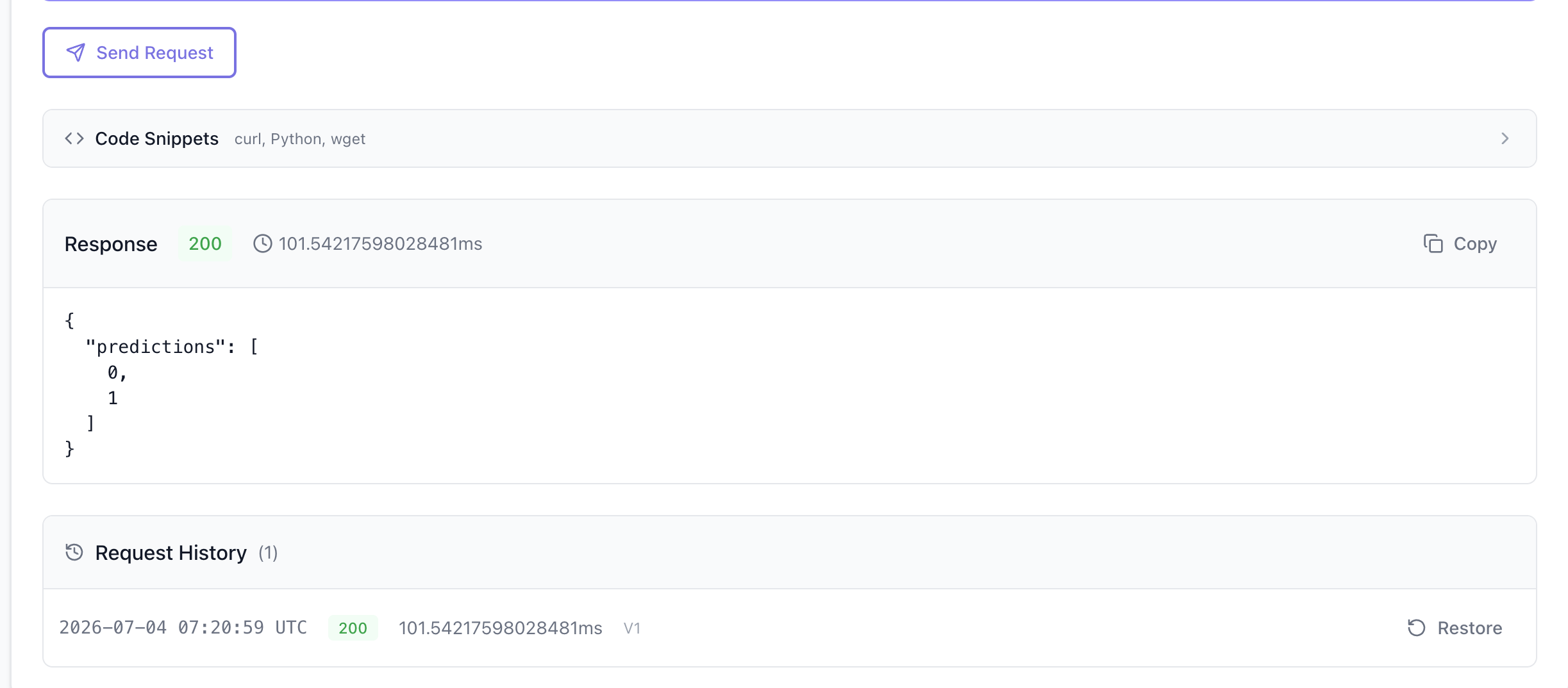
The response shows the predicted class for each row.
For more realistic examples that cover different frameworks, storage backends, and deployment patterns, use the prokube/examples repository. It is cloned into managed Labs by default (under ~/examples/serving/) and includes notebooks and scripts you can run directly.
Run the Examples
| Example | Use when |
|---|---|
serving/minimal-s3-model | You want an end-to-end workflow: train a model, upload to S3-compatible storage, deploy as InferenceService, and test it. Includes a Jupyter notebook. |
serving/mlflow-kserve-minimal | You have a model tracked in MLflow and want to deploy it with the mlflow:// storage URI and v2 protocol. No custom container required. |
serving/mlflow-kserve-inference-protocols | You want to compare v1 vs v2 inference protocol request bodies and InferenceService manifests for MLflow models. |
serving/hf-vllm-completion | You want to serve an LLM with vLLM (GPU) or Hugging Face (CPU) backend, with OpenAI-compatible chat completion API. |
serving/minimal-custom-kserve-predictor | You need a custom inference container with your own logic. Shows local development, container image building, and deployment. |
serving/kserve-keda-autoscaling | You need KEDA-based autoscaling with custom Prometheus metrics (e.g. vLLM token throughput). Includes load generator and calibration scripts. |
serving/minimal-example-shadow-deployment | You want to test a new model variant against production traffic without serving real users. Uses Istio VirtualService for traffic mirroring. |
UI Reference
The creation wizard has two tabs: Form and YAML.
Form Tab
The form guides you through the required fields:
- Model Name – a Kubernetes-safe name for the InferenceService.
- Framework – select the ML framework your model was trained with. Supported frameworks include Scikit-learn, TensorFlow, PyTorch, ONNX, XGBoost, LightGBM, Triton, Hugging Face, and Custom (for arbitrary container images).
- Storage URI – the path to your model artifact. Use the buttons next to the field to pick a source:
- Browse S3 – opens the S3 browser for your workspace. Navigate buckets and select a model directory.
- Import from MLflow – opens the MLflow model picker. Browse the Model Registry by version or stage alias, or select a run artifact directly. The resulting URI uses the
mlflow://scheme, which KServe resolves through a custom storage initializer that downloads the model via the MLflow API (no cross-namespace S3 credentials required).
- Runtime Version – optional; pins the KServe serving runtime image version.
When Custom framework is selected, the Storage URI field is replaced by Container Image (the full image reference) and Container Port (default 8080).
Optional sections (collapsible):
- Scaling – min and max replicas. Set min replicas to
0for scale-to-zero. - Resources – CPU and memory requests and limits, plus optional GPU count.
YAML Tab
Paste a raw KServe InferenceService manifest, optionally with a ScaledObject separated by ---. Use Load Example to populate the editor with a valid template:
yaml
apiVersion: serving.kserve.io/v1beta1
kind: InferenceService
metadata:
  name: my-model
spec:
  predictor:
    model:
      modelFormat:
        name: sklearn
      storageUri: s3://my-bucket/my-model
      resources:
        requests:
          cpu: 100m
          memory: 256Mi
        limits:
          cpu: "1"
          memory: 1Gi
You can also Upload File to load a .yaml or .yml manifest from disk.
Switching to the YAML tab auto-generates a preview from the form data. Switching back parses the YAML back into form fields and warns about unsupported fields (transformer, explainer, nodeSelector, tolerations, affinity, etc.).
Click Deploy from YAML to create the resource directly.
The YAML tab makes the pattern explicit: use the UI for quick creation, inspect the generated manifest to understand the resource, and use the same manifest with kubectl for GitOps-driven production deployments.
After Deployment
The detail page shows the InferenceService status, endpoint URLs, configuration, and resource allocation across several tabs:
| Tab | Content |
|---|---|
| Overview | Endpoint URLs (V2 and V1 protocols), configuration card, resources card, timestamps |
| Test | Interactive inference testing panel |
| Metrics | Grafana dashboards for the endpoint |
| Logs | Inference pod logs |
| Events | Kubernetes events for the InferenceService |
| Conditions | KServe condition status |
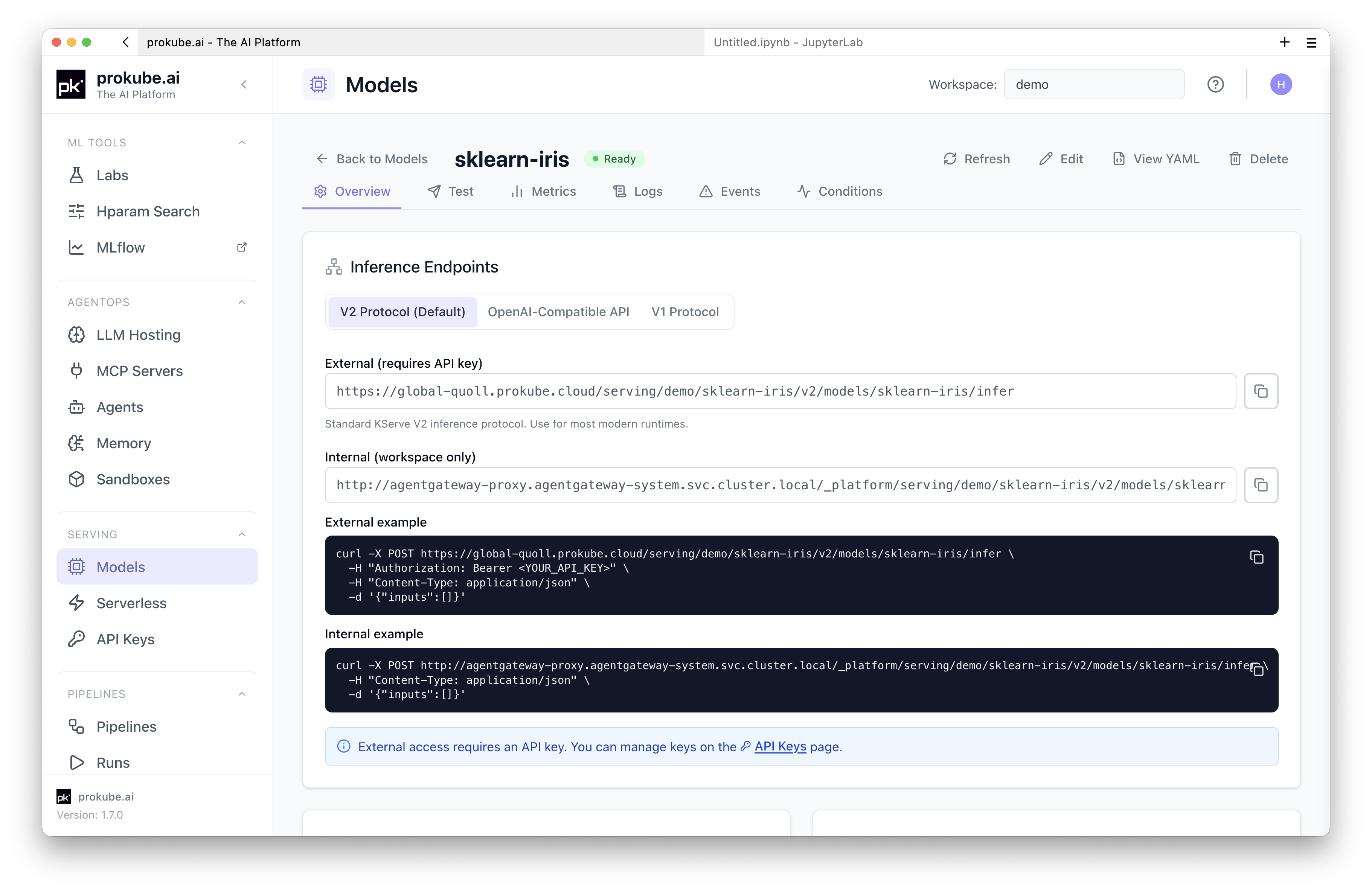
From the detail page header you can Edit, View YAML, or Delete the model. The View YAML modal shows the live manifest and allows editing with an Apply Changes flow – the same YAML can be checked into version control and applied through kubectl.
Test a Deployed Model
The Test tab provides an interactive panel for sending inference requests without leaving the UI.
- Protocol – select V2 (Open Inference Protocol) or V1 (TensorFlow Serving style). The panel auto-generates a starter request body for the selected protocol.
- Request body – edit the JSON payload in the monospace editor. Use Format to prettify. Validation runs live.
- Timeout – set a timeout in seconds (5–300, default 60).
- Send Request – submits the payload to the live endpoint. The response shows HTTP status code, latency, and the response body.
The panel also generates code snippets (curl, Python, wget) with the Authorization: Bearer header pre-filled, so you can reproduce the request outside the UI. You need a valid API key for external requests — see API Keys.
Request history (last 10) is preserved during the session; click Restore to reload a previous payload.
Autoscaling
Upstream documentation
For autoscaling features that are not specific to prokube, use the upstream documentation:
KServe supports three autoscaling strategies:
- Knative Pod Autoscaler (KPA) – the default. Scales on concurrency or QPS. Supports scale-to-zero when min replicas is
0. - Kubernetes HPA – scales on CPU or memory utilisation.
- KEDA – scales on custom Prometheus metrics, useful for LLM workloads (e.g. vLLM token throughput). See the
kserve-keda-autoscalingexample.
Configure scaling through the Scaling section in the deployment form, or set scaleTarget, scaleMetric, and minReplicas/maxReplicas directly in the YAML manifest.
For strict per-replica request concurrency, use KServe/Knative YAML fields such as containerConcurrency. For LLM workloads, request count is often not enough to model load accurately; token throughput, queue depth, and GPU memory pressure can be better scaling signals. The kserve-keda-autoscaling example shows a KEDA-based pattern for this.
KEDA and the Knative Pod Autoscaler should not manage the same workload at the same time. If you configure KEDA manually, use the deployment mode and annotations required by your KServe version and cluster policy.
For a detailed KPA walkthrough and a manual KEDA/vLLM token-throughput example, see Model Serving Autoscaling.
Storage and Credentials
S3-compatible Storage
InferenceServices access models in S3-compatible file storage through a ServiceAccount annotated with S3 endpoint details. The prokube workspace is preconfigured with S3-compatible storage; use the File Storage page in the UI to see available buckets. See File Storage for storage browser, path, and client details.
For models stored in workspace buckets, the deployment wizard's Browse S3 button selects the path directly. For kubectl-based deployment, a secret named s3creds with the correct KServe annotations already exists in the workspace namespace and grants access to the buckets the workspace can see. Reference it from the InferenceService via spec.predictor.serviceAccountName.
MLflow Model Registry
Use storageUri values starting with mlflow:// to deploy models registered in MLflow without exposing S3 credentials across namespaces. This requires a secret named mlflow-credentials in the same namespace as the InferenceService, containing MLFLOW_TRACKING_URI, MLFLOW_TRACKING_USERNAME, and MLFLOW_TRACKING_PASSWORD. The wizard's Import from MLflow button helps select the model; the secret must exist in the namespace before deployment. See MLflow for instructions on creating the secret and obtaining your credentials.
The URI format:
mlflow://models/<model-name>/<version>– specific versionmlflow://models/<model-name>/<stage>– stage alias (staging,production,latest)mlflow://runs/<run-id>/<artifact-path>– run artifact
A custom mlflow-storage-initializer init container resolves these URIs by fetching the model artifact through the MLflow API with the credentials from the workspace's mlflow-credentials secret. Import from MLflow checks that this secret exists but does not create it.
External Access
To call a model endpoint from outside the cluster, you need an API key. Create one on the API Keys page, under Serving in the sidebar, and scope it to the model or to all serving models in the workspace. See API Keys for details. This external path is served by Agent Gateway, the same routing layer used across MLOps and AgentOps.
Include the key in requests:
Authorization: Bearer <api-key>The inference URL follows this pattern:
https://<cluster-domain>/svc/serving/<namespace>/<inference-service-name>/v2/models/<model-name>/inferThe UI shows the exact URL for each protocol (V1 and V2) on the model detail page.
Version Matching
Python library versions used during training should match the versions in the KServe serving runtime. Mismatches cause ModuleNotFoundError or pickle deserialisation failures at model load time.
To check the cluster KServe version from your own InferenceService:
sh
kubectl get pod <your-pod-name> -n <your-namespace> \
  -o jsonpath="{.spec.initContainers[?(@.name=='storage-initializer')].image}" \
  | cut -d':' -f2
Alternatively, ask your administrator for the current KServe version.
To find library versions pinned in a runtime image, browse the KServe repository at the matching tag under python/<runtime>/pyproject.toml.
Version matching is especially important for models serialized with pickle, joblib, or framework-native formats that load Python objects. A model trained with one scikit-learn, PyTorch, XGBoost, or Python version can fail during serving even when the artifact path and credentials are correct.
Administrators can inspect installed ServingRuntime and ClusterServingRuntime resources to identify the runtime image used by a deployment:
bash
kubectl get servingruntime,clusterservingruntime -ALocal Model Cache
KServe's local model cache pre-downloads a model from its storage URI to local disks on a group of nodes. InferenceService pods on those nodes then start from the local copy instead of downloading the model. Use it to cut startup time for large models that are redeployed often or scaled out to many replicas.
The local model cache is a cluster-level feature and is off by default. Administrators enable the KServe LocalModel controller and its node agent, which runs as a privileged DaemonSet. They also define the node groups and the models to cache, and provide enough node-local storage. Ask your administrator whether it is available. Storing a large model in S3-compatible file storage does not enable node-local caching on its own.
This is not the same as managed model caching in LLM Serving. Managed caching copies a preset's weights from Hugging Face into workspace S3 or a dedicated PVC, and workspace users start it from the UI.
Troubleshooting
Start with the model detail page in the UI. The Conditions tab surfaces KServe condition states. The Logs tab shows predictor pod logs. The Events tab shows Kubernetes events.
Use the Logs browser when you need to search retained logs by pod, container, label, or time range.
Common causes:
- Model not Ready – check the Conditions tab for the failure reason. Common issues: invalid storage URI, missing credentials, insufficient resources.
- ModuleNotFoundError – library version mismatch between training and serving runtime. See Version Matching.
- Image pull errors – verify the container image reference and registry credentials for custom predictors.
- 401 Unauthorized – missing or invalid API key. Create an API key on the API Keys page, under Serving in the sidebar.
- Pods are running but the InferenceService is not ready – check KServe conditions first. If the model and transformer pods look healthy but readiness does not progress, an administrator may need to inspect Knative Serving controller logs and route status.
- Model load timeout – large models may need a longer Knative progress deadline or an administrator-configured local model cache. In YAML, set
serving.knative.dev/progress-deadlineunderspec.predictor.annotationswhen supported by your cluster. - Service IP range exhausted – errors such as
failed to allocate a serviceIP: range is fullare cluster-level capacity issues. Ask an administrator to inspect stale Services, Knative revision garbage collection, and service CIDR capacity. - Model needs a specific node type – use YAML to set
spec.predictor.nodeSelector, affinity, or tolerations when the cluster allows those fields. The form may not expose advanced scheduling fields.
Example progress-deadline annotation:
yaml
apiVersion: serving.kserve.io/v1beta1
kind: InferenceService
metadata:
  name: large-model
spec:
  predictor:
    annotations:
      serving.knative.dev/progress-deadline: 180m
    model:
      modelFormat:
        name: huggingface
      storageUri: s3://models/large-model
Example node selector:
yaml
apiVersion: serving.kserve.io/v1beta1
kind: InferenceService
metadata:
  name: gpu-model
spec:
  predictor:
    nodeSelector:
      nvidia.com/gpu.product: NVIDIA-H100-NVL
    model:
      modelFormat:
        name: huggingface
      storageUri: s3://models/gpu-model