

Appearance
Hparam Search
prokube exposes Kubeflow Katib for running hyperparameter tuning experiments in your workspace.
When to Use Hparam Search
Use Hparam Search when you have training code that should run as repeatable Kubernetes jobs and you want Katib to try parameter combinations for you:
- optimize model parameters such as learning rate, batch size, number of layers, hidden dimensions, kernel size, dropout, or weight decay;
- compare trials with a consistent objective metric;
- use cluster compute to run several trials in parallel inside the workspace namespace;
- keep experiment, trial, log, metric, and YAML inspection in one UI;
- move from manual notebook experiments to repeatable Kubernetes jobs.
Katib schedules trial jobs and tracks their metrics. It does not write your training code, build your image, choose a valid search space, or persist model artifacts automatically. Your container must accept trial parameters and print or expose the objective metric in the format configured by the experiment.
What Katib Optimizes
Katib is framework-agnostic. It works with PyTorch, TensorFlow, JAX, XGBoost, scikit-learn, or custom training code in any language, as long as the trial job can receive parameters and report metrics.
Common use cases include:
- hyperparameter tuning for existing training code;
- neural architecture search, where the search space describes model structure;
- early stopping of underperforming trials, when configured by the experiment.
Katib is not a full AutoML system. It does not choose the model family, clean data, perform feature engineering, or decide which metric matters. You define the training workload, objective metric, parameter ranges, search algorithm, and resource requirements.
Supported search algorithms depend on the Katib installation, but common choices include random search, Bayesian optimization, TPE, Hyperband, CMA-ES, and neural-architecture-search algorithms such as ENAS or DARTS. Katib can also integrate with Optuna-based suggestion services where enabled by the platform.
Workspace Scope
Hparam Search is scoped to the selected prokube workspace. The selected workspace determines the Kubernetes namespace where Katib Experiment, Trial, Suggestion, Job, and Pod resources are created and listed.
Before creating or applying an experiment, select the correct workspace in the prokube UI. For workspace behavior and access implications, see Workspaces. For kubeconfig, pod quota, image pull credentials, and Kubernetes troubleshooting, see Kubernetes Resources.
Quick Start with the Katib SDK
The Katib Python SDK is useful for quick experiments from a notebook because it can create an experiment directly from a Python objective function.
This pattern only works from inside the cluster, for example in a prokube JupyterLab or VS Code Lab, where the notebook already has Kubernetes service account credentials for the selected workspace. If the SDK is not available in your Lab image, install it first:
python
%pip install kubeflow-katibThen run a minimal experiment:
python
# [1] Create an objective function.
def objective(parameters):
    import time

    time.sleep(5)
    result = 4 * int(parameters["a"]) - float(parameters["b"]) ** 2
    print(f"result={result}")


import kubeflow.katib as katib


# [2] Create the hyperparameter search space.
parameters = {
    "a": katib.search.int(min=10, max=20),
    "b": katib.search.double(min=0.1, max=0.2),
}


# [3] Create a Katib Experiment with 12 trials.
katib_client = katib.KatibClient()

name = "tune-experiment"
katib_client.tune(
    name=name,
    objective=objective,
    parameters=parameters,
    objective_metric_name="result",
    max_trial_count=12,
    resources_per_trial={"cpu": "2"},
)


# [4] Wait until the experiment is complete.
katib_client.wait_for_experiment_condition(name=name)


# [5] Get the best hyperparameters.
print(katib_client.get_optimal_hyperparameters(name))
When running this from a prokube Lab, leave the namespace unset. The Katib client then uses the namespace of the running notebook pod, which keeps the experiment in the selected workspace.
Use the SDK for fast iteration and small examples. For production-like experiments, prefer the containerized training-script pattern below: it gives you explicit control over the image, dependencies, resource requests, metric collection, and the exact Katib Experiment YAML you can review and reuse.
For a more realistic experiment with richer trial results in the UI, continue with the MNIST example below.
Run the Minimal MNIST Example
The public prokube/examples repository contains a minimal Katib example that trains an scikit-learn SVM on the MNIST digits dataset.
Managed Labs clone this repository into ~/examples by default. If your Lab does not have it, clone it manually:
bash
git clone https://github.com/prokube/examples.git ~/examplesThe example is split into two parts:
| Path | Purpose |
|---|---|
images/minimal-mnist | Training script, Python dependencies, and Dockerfile for the training image. |
hparam-tuning/minimal-mnist | Katib Experiment manifest that references the training image. |
1. Check the Training Script
The training script accepts hyperparameters as CLI options:
bash
python ./training_script.py --gamma 0.01 --c 1 --kernel rbf --degree 3 --coef0 0.0For Katib, the important part is metric output. The script prints timestamped metrics to stdout:
text
2026-07-06T12:00:00.000Z Train-Accuracy=0.99
2026-07-06T12:00:00.000Z Validation-Accuracy=0.97
2026-07-06T12:00:00.000Z Test-Accuracy=0.96
The example experiment uses Validation-Accuracy as the objective metric and collects metrics from stdout.
2. Build and Push the Training Image
For your own experiments, build a training image and push it to a registry that your workspace can pull from. Log in to the registry first; the exact login command depends on the registry you use. Labs build images on a remote BuildKit service without a local image store, so build and push in one step:
bash
cd ~/examples/images/minimal-mnist
docker buildx build -t <registry>/<project>/minimal-mnist:latest --push .
Then update the image field in ~/examples/hparam-tuning/minimal-mnist/katib-experiment.yaml to your pushed image. See Building Container Images for how image builds work in Labs.
By default, the example manifest references a prepared image in the prokube release registry:
text
europe-west3-docker.pkg.dev/prokube/releases/minimal-mnist:v1.0.0Pulling it requires access to the prokube registry. If your cluster cannot pull it, use your own pushed image instead.
For private registries, create pull credentials from the prokube user menu under Registry Credentials before starting the experiment. See Registry Credentials.
3. Inspect the Experiment Manifest
The minimal example defines a Katib Experiment named random-mnist:
yaml
apiVersion: kubeflow.org/v1beta1
kind: Experiment
metadata:
  name: random-mnist
spec:
  objective:
    type: maximize
    goal: 1.2
    objectiveMetricName: Validation-Accuracy
    additionalMetricNames:
      - Train-Accuracy
  algorithm:
    algorithmName: bayesianoptimization
  parallelTrialCount: 3
  maxTrialCount: 6
  maxFailedTrialCount: 3
The parameter search space is declared under spec.parameters:
yaml
parameters:
  - name: gamma
    parameterType: double
    feasibleSpace:
      min: "0.01"
      max: "0.1"
  - name: c
    parameterType: double
    feasibleSpace:
      min: "1"
      max: "100"
  - name: kernel
    parameterType: categorical
    feasibleSpace:
      list:
        - rbf
        - sigmoid
The trial template maps Katib trial parameters into the container command:
yaml
command:
  - "python"
  - "./training_script.py"
  - "--gamma=${trialParameters.gamma}"
  - "--c=${trialParameters.c}"
  - "--kernel=${trialParameters.kernel}"
  - "--degree=${trialParameters.degree}"
Keep parameter names consistent across spec.parameters, trialTemplate.trialParameters, and the command arguments accepted by your training script.
4. Start the Experiment
Open Hparam Search in the prokube UI, select the target workspace, click Apply YAML, and paste the contents of katib-experiment.yaml.
Alternatively, from a Lab in the target workspace, run:
bash
cd ~/examples/hparam-tuning/minimal-mnist
kubectl create -f katib-experiment.yaml
Inside a managed Lab, kubectl uses the Lab pod service account and defaults to the Lab workspace namespace. If you run the command outside prokube, use a kubeconfig for the target workspace. See Download Kubeconfig.
5. Track Results in the UI
Open Hparam Search in the prokube UI.
The experiment list shows experiments in the selected workspace. Use Refresh if the list does not update immediately. Open random-mnist to inspect:
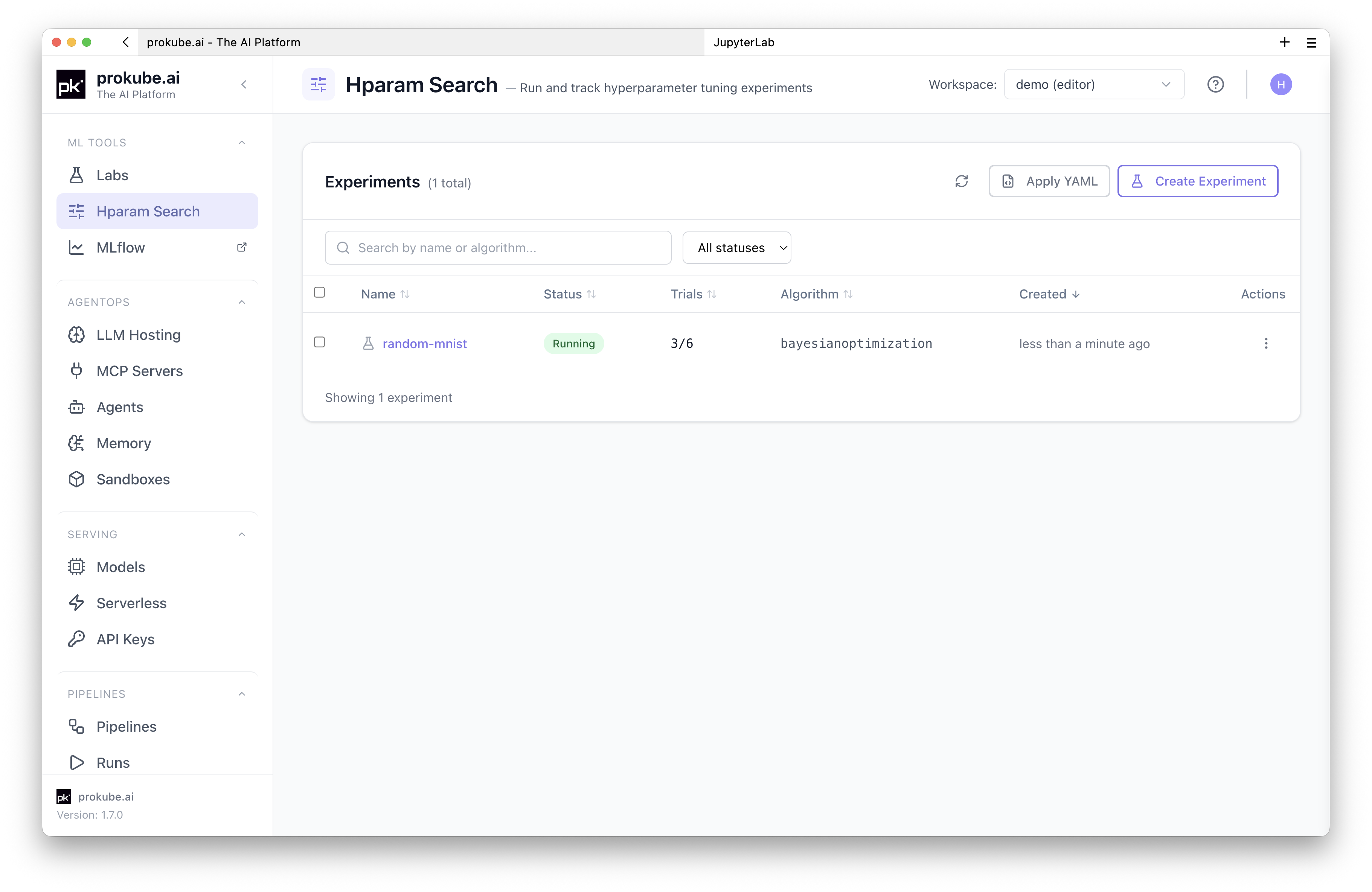
| Tab | Content |
|---|---|
| Overview | Objective, algorithm, parameter search space, current optimal trial, and run status. |
| Trials | Trial status, sampled parameter assignments, observed metrics, and best-trial highlighting. |
| Conditions | Katib condition history for debugging scheduling, success, and failure states. |
| YAML | Live experiment manifest for inspection and reuse. |
Open a trial from the trials table to inspect trial details, logs, and collected metrics.
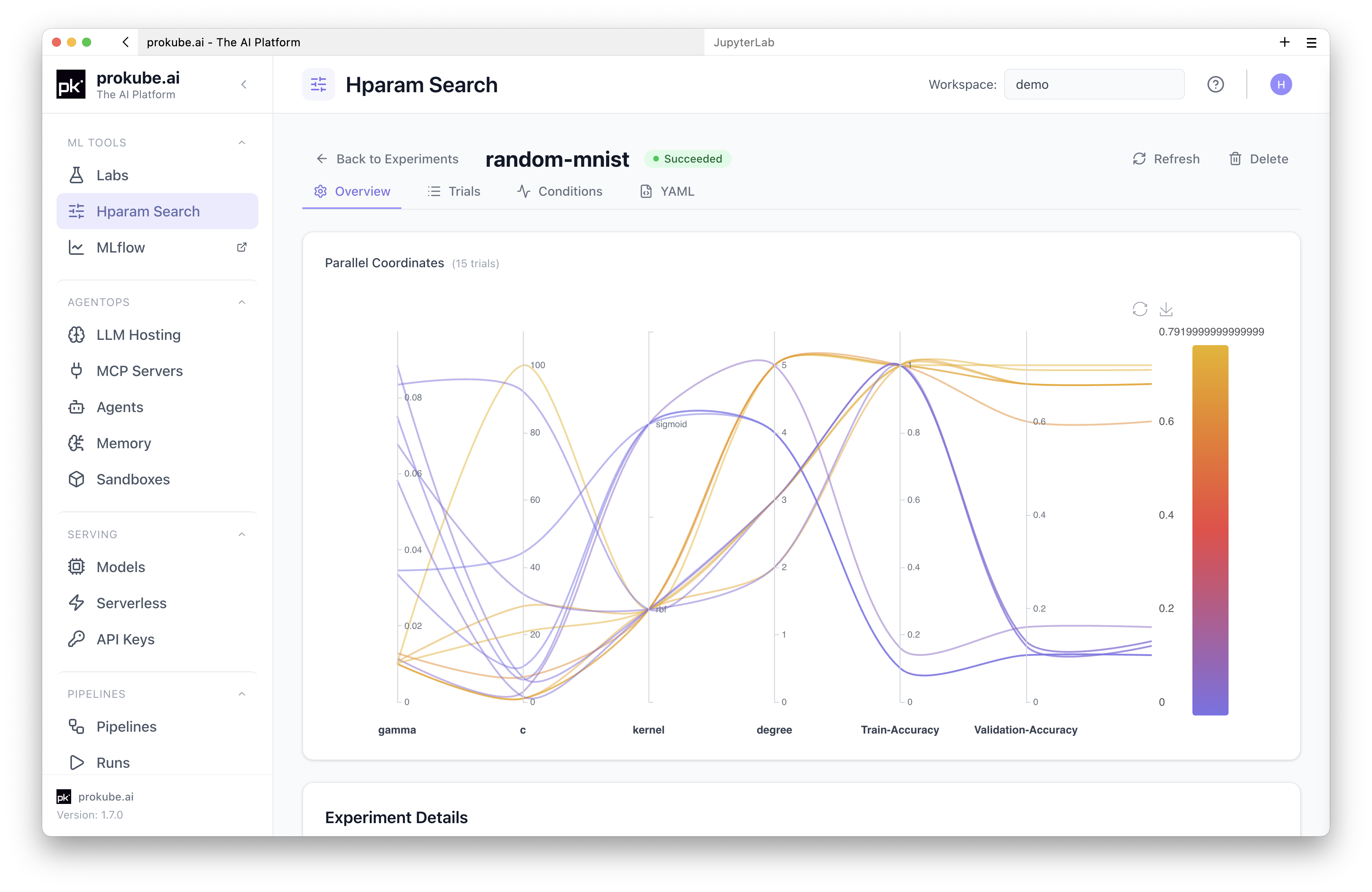
The experiment detail view also includes a parallel coordinates plot for comparing trial parameters against the objective metric. Use it to identify which parameter ranges produced better trials before narrowing the search space in a follow-up experiment.
6. Delete the Experiment
When you are done, delete the experiment and its trials:
bash
cd ~/examples/hparam-tuning/minimal-mnist
kubectl delete -f katib-experiment.yaml
You can also delete experiments from the Hparam Search UI. Deleting an experiment terminates running trials and removes the associated Katib resources.
Extend an Experiment
You can adjust a Katib experiment while it is running, for example when early trial results look useful and you want to run more trials or change how many trials run in parallel.
Katib only supports changing these trial-count fields on an existing experiment:
parallelTrialCount- how many trials Katib may run at the same time;maxTrialCount- the maximum number of trials for the experiment;maxFailedTrialCount- how many failed trials are allowed before the experiment fails.
Apply a small update manifest in the workspace namespace:
yaml
apiVersion: kubeflow.org/v1beta1
kind: Experiment
metadata:
  name: random-mnist
spec:
  parallelTrialCount: 3
  maxTrialCount: 12
  maxFailedTrialCount: 3
bash
kubectl apply -f random-mnist-update.yamlIncrease spec.maxTrialCount to let Katib create additional trials. The new value must be greater than the number of trials that have already succeeded. Change spec.parallelTrialCount to increase or decrease parallel execution, subject to workspace quota and available cluster resources.
To resume an experiment after it has reached Succeeded because maxTrialCount was reached, set a resume policy before running it:
yaml
spec:
  resumePolicy: LongRunning
With LongRunning, Katib keeps the suggestion service running after the experiment succeeds, so you can increase maxTrialCount later and continue the search. Without a resumable policy, the default behavior is Never: Katib cleans up the suggestion service after completion and the finished experiment cannot be restarted.
Use this for iterative search refinement, not as a substitute for versioning experiments. If you change the training image, objective metric, command, or search space structure, create a new experiment so results remain comparable.
Create Experiments from the UI
Hparam Search supports two creation paths:
- Create Experiment opens a guided form for objective, algorithm, parameters, trial thresholds, metric collection, and trial template configuration.
- Apply YAML applies a complete Katib
Experimentmanifest directly.
Use the form when you want to build a simple experiment interactively. Use YAML when you already have a reviewed manifest, want to reuse an example, or manage experiments through version control.
Trial templates can be inline YAML or a ConfigMap Reference. Use inline YAML for most first experiments. Use ConfigMap references when several experiments should share the same trial job template. For the ConfigMap format and template-reference fields, see the upstream Katib trial templates documentation.
Training Image Requirements
Your training image should make trial inputs and metric output explicit.
It should:
- accept all tunable parameters from command-line arguments or environment variables;
- print the objective metric name exactly as configured in
objectiveMetricName; - exit with a non-zero status when training fails so Katib can count failed trials;
- include all runtime dependencies in the image instead of installing them interactively;
- write models and artifacts to S3-compatible file storage if they must survive trial pod cleanup.
For image builds from Labs, see Building Container Images. For workspace file storage, see File Storage.
Operational Notes
Katib trials create Kubernetes jobs and pods in your workspace namespace. Large experiments can consume pod quota quickly, especially with high parallelTrialCount values or retained trial resources. Monitor quota and clean up completed pods when needed. See Pod Quota and Cleanup.
Start conservatively:
- keep
maxTrialCountsmall while validating the image and metric collector; - keep
parallelTrialCountbelow the number of trials your quota and resources can support; - set
maxFailedTrialCountlow enough to stop broken manifests early; - use
retain: truewhile debugging, then lower retention once completed pods accumulate.
Set trial CPU, memory, and GPU resources explicitly. In Katib Experiment YAML, set them under the container's resources field in the trial template. With the Katib SDK, use resources_per_trial. Too-small limits can make trials slow or unstable even when the search algorithm is working correctly.
Deep learning workloads that use multi-worker data loaders may need more shared memory than the Kubernetes default. This commonly affects PyTorch DataLoader workers and can show up as errors such as:
text
Unexpected bus error encountered in worker. This might be caused by insufficient shared memory.To increase shared memory for a Katib trial, mount an in-memory emptyDir at /dev/shm in the trial pod. In an Experiment manifest, volumeMounts belong to the training container and volumes belong to the pod spec:
yaml
trialTemplate:
  trialSpec:
    apiVersion: batch/v1
    kind: Job
    spec:
      template:
        spec:
          containers:
            - name: training-container
              image: <registry>/<project>/<image>:<tag>
              volumeMounts:
                - name: dshm
                  mountPath: /dev/shm
          volumes:
            - name: dshm
              emptyDir:
                medium: Memory
                sizeLimit: "512Mi"
          restartPolicy: Never
Adjust sizeLimit to the workload and node capacity. This memory is backed by node memory, so avoid setting it higher than the trial actually needs.
Troubleshooting
| Symptom | Check |
|---|---|
| Experiment does not appear in Hparam Search | Confirm the selected workspace matches the namespace where you applied the manifest. Run kubectl get experiments.kubeflow.org. |
| Trials stay pending | Check pod quota, requested resources, image pull errors, and namespace events. |
| Trials are slow | Check CPU, memory, and GPU requests and limits in the trial template or resources_per_trial. Also check whether parallelTrialCount is lower than expected. |
| Trials fail immediately | Open the trial logs. Verify the image exists, the command path is correct, and the script accepts all generated arguments. |
| No objective metric is shown | Confirm objectiveMetricName exactly matches the metric printed by the training script and that metricsCollectorSpec.collector.kind matches the output method. |
| Private image cannot be pulled | Add registry credentials for the workspace and confirm the image reference includes the correct registry, project, repository, image, and tag. |
| Trial logs show shared-memory or bus errors | Increase /dev/shm for the trial pod with an in-memory emptyDir volume. This is common with PyTorch data loaders using multiple workers. |
| New trials stop being scheduled after earlier trials finish | Check Katib suggestion pods and events. If a suggestion controller is OOMKilled or CPU-throttled, an administrator may need to increase suggestion-controller resources in the Katib configuration. |
| Too many completed pods | Delete finished experiments to remove their trial resources, or reduce experiment size and trial retention. The System Status cleanup removes only completed pipeline pods, not Katib trial pods. |