

Appearance
MLflow
prokube provides a central MLflow tracking server for experiment tracking, artifact logging, and model registry workflows.
MLflow references
References:
Access MLflow
Open MLflow from the prokube UI sidebar. MLflow opens in a separate browser tab or window at:
text
https://<your-prokube-domain>/mlflow/MLflow is not scoped by the prokube workspace selector. It is a central service with its own MLflow permissions. Selecting a different workspace in the prokube UI does not change which MLflow experiments, runs, or registered models you can see.
prokube uses the open-source mlflow-oidc-auth plugin for MLflow authentication and authorization. If your browser session is not already authenticated for MLflow, the MLflow tab redirects you to the OIDC login flow. Sign in with your prokube identity, then continue to the MLflow UI.
After login, you can create and compare runs, inspect artifacts, and manage registered models.
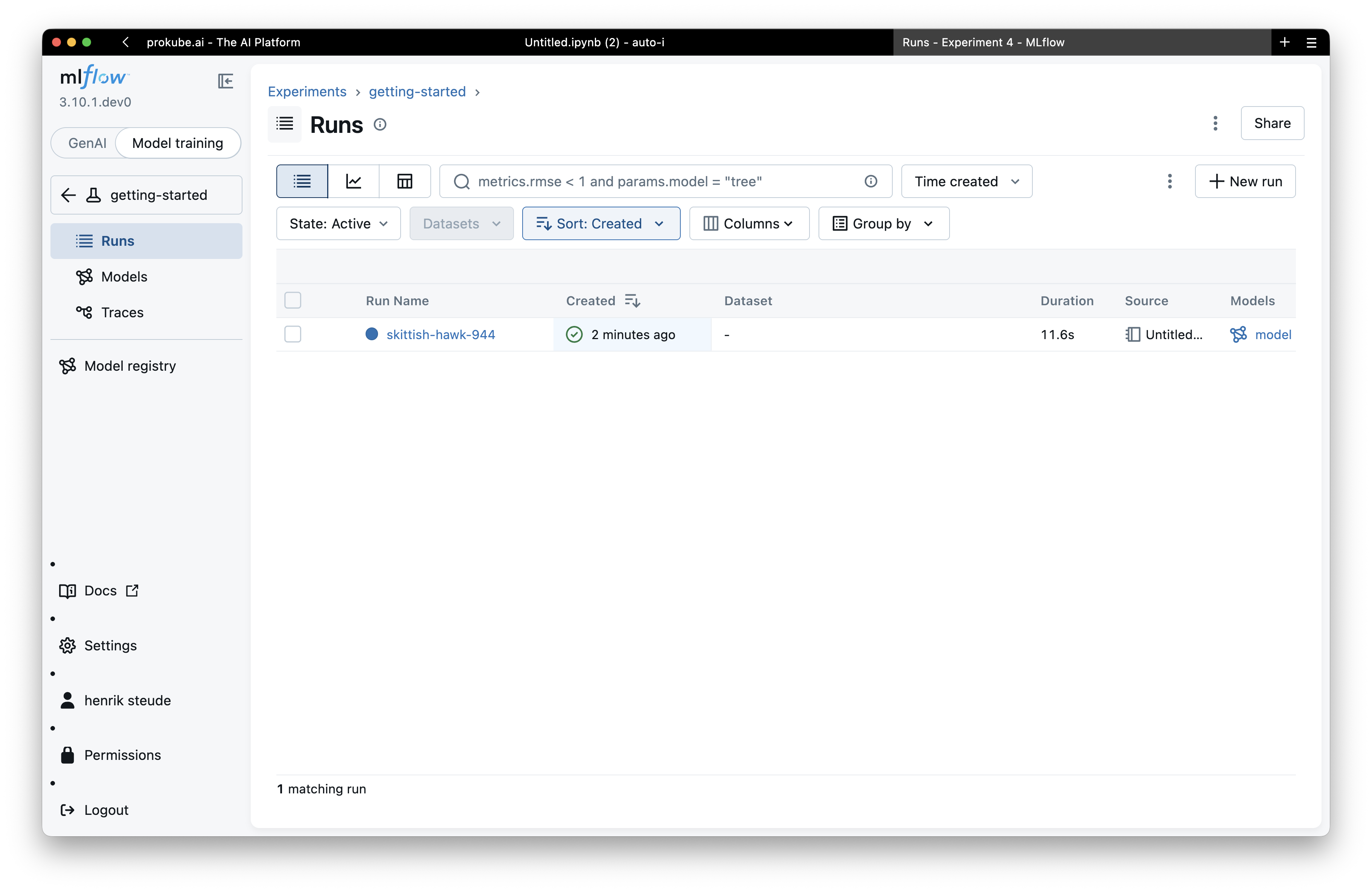
Use MLflow from a Lab
For programmatic access from a JupyterLab, VS Code Lab, pipeline component, or external script, create a personal access token in MLflow and configure the MLflow client with basic-auth-style environment variables.
Create a Personal Access Token
In the MLflow UI, open the OIDC permissions page and create an access key. Copy the token immediately; it is shown only once.
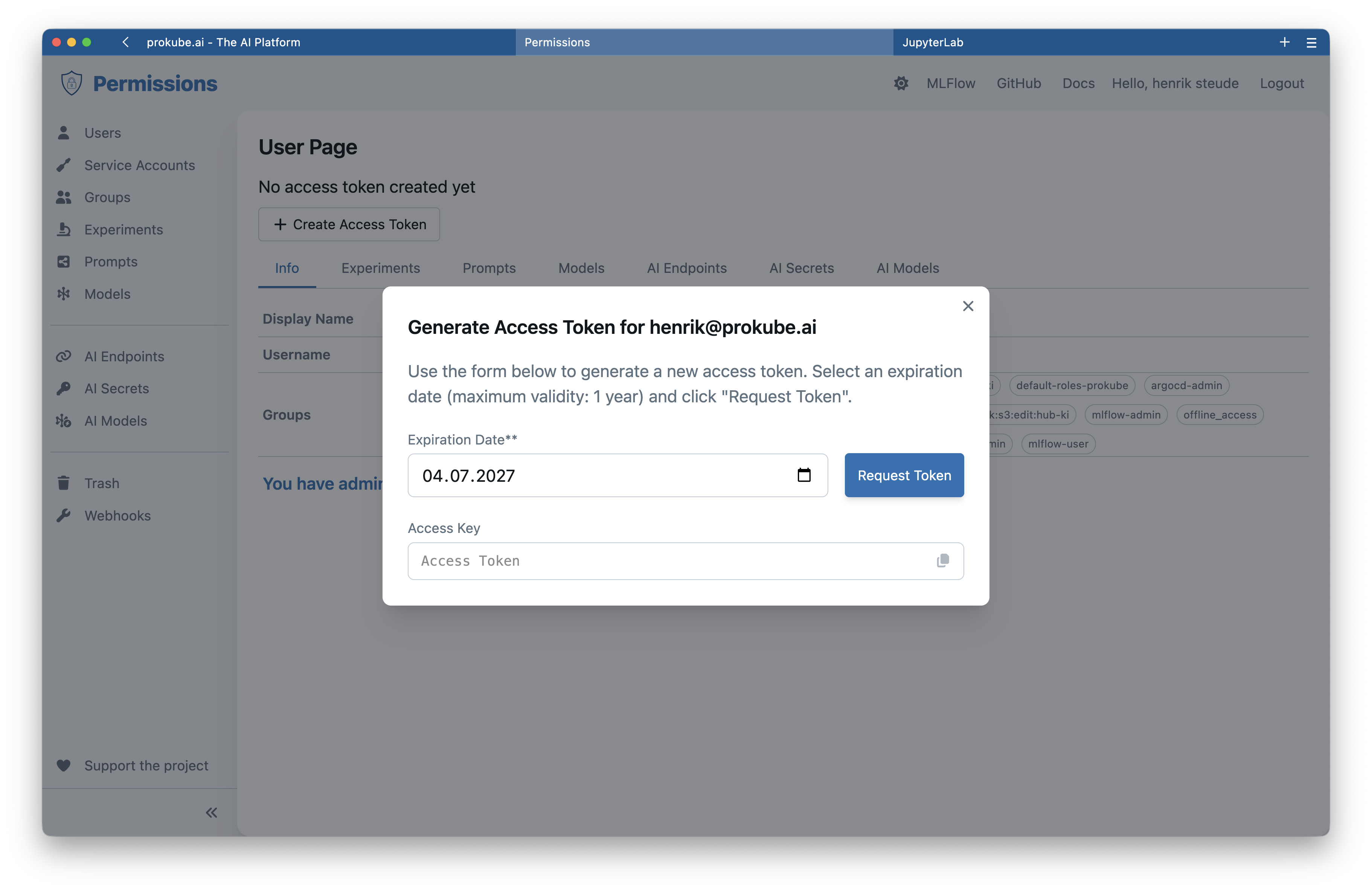
A user can have one active personal access token. Creating a new token invalidates the previous one.
Configure the MLflow Client
Set these variables before using the MLflow Python client:
python
import os

os.environ["MLFLOW_TRACKING_URI"] = "https://<your-prokube-domain>/mlflow/"
os.environ["MLFLOW_TRACKING_USERNAME"] = "your-email@example.com"
os.environ["MLFLOW_TRACKING_PASSWORD"] = "<your-personal-access-token>"
os.environ["MLFLOW_ENABLE_PROXY_MULTIPART_UPLOAD"] = "true"
Then log a first run from a Lab:
python
import mlflow
from sklearn import datasets, svm

iris = datasets.load_iris()
model = svm.SVC().fit(iris.data, iris.target)

mlflow.set_experiment("my-experiment")

with mlflow.start_run():
    mlflow.log_param("model", "SVC")
    mlflow.log_param("dataset", "iris")
    mlflow.log_metric("accuracy", 0.97)
    mlflow.log_metric("f1_score", 0.96)
    mlflow.sklearn.log_model(
        sk_model=model,
        name="model",
    )
Refresh the MLflow UI after the run completes to inspect the experiment, metrics, artifacts, and model.
The public prokube/examples repository contains runnable MLflow notebooks. Managed Labs clone it into ~/examples by default.
Relevant examples:
| Example | Use when |
|---|---|
mlflow/mlflow-quickstart-example.ipynb | You want a minimal notebook that logs parameters, metrics, and a model to MLflow. |
mlflow/mlflow-image-example.ipynb | You want to log image artifacts in addition to scalar metrics. |
mlflow/mlflow-kfp-example.ipynb | You want to use MLflow tracking inside a Kubeflow Pipeline. |
mlflow/mobile-price-classification | You want a pipeline-oriented example that tracks a model and registers it in MLflow. |
MLflow artifacts are stored through platform-managed file storage. For general file browsing and S3-compatible client access, see File Storage.
Permissions and Naming
MLflow permissions are independent of prokube workspace membership.
Default behavior:
- you can create experiments, runs, and registered models;
- you receive manage permissions on MLflow resources you create;
- other users do not automatically get access to your MLflow resources;
- MLflow admins can manage users, service accounts, groups, and permissions.
Common permission levels:
| Level | Use for |
|---|---|
| READ | Serving workloads and reviewers that only need to read experiments, runs, registered models, and model versions. |
| EDIT | Training workloads that need to create runs, log metrics and artifacts, or create model versions, but should not delete resources or manage permissions. |
| MANAGE | Users or admin-owned service accounts that need full control, including permission changes and cleanup of old experiments, runs, or model versions. |
Administrators can grant access to users or groups. Group-based permissions are the preferred pattern for team resources because they avoid granting access user by user.
MLflow administrators manage users, groups, service accounts, and permissions in the MLflow OIDC permissions UI, where the deployment exposes it. They can also manage every experiment, run, registered model, and prompt. Treat MLflow admin access as platform-level access: it can expose experiments and artifacts across teams.
After Keycloak group or role changes, users may need to sign out and sign in again before MLflow receives updated claims.
For shared workspaces, MLflow service-account tokens are the recommended way to authenticate shared pipelines and scheduled jobs. Ask an administrator to create an MLflow service account and generate a token for it instead of storing one person's personal token in a shared namespace.
For team workflows, create shared experiments and registered models owned by a group or service account, then grant group permissions explicitly. Avoid building pipelines around one user's personal MLflow token; when that user rotates or loses the token, scheduled jobs fail.
Experiment names, prompt names, and registered model names are global in the central MLflow instance. If a name already exists and you do not have access to it, MLflow may return a permission error rather than a simple name-conflict message.
Use MLflow in Pipelines
Pipeline components need MLflow credentials at runtime. Store the tracking URI, username, and token in a Kubernetes secret in the workspace namespace, then inject the values into the tasks that use MLflow.
Personal tokens in workspace secrets
Every contributor with permission to view or edit Kubernetes secrets in the workspace namespace can read this token. A personal MLflow token grants access as your MLflow user. In shared workspaces, use an MLflow service-account token created by an administrator instead of a personal token.
Create the secret from a Lab in the target workspace, or create it from the prokube UI under K8s Secrets. See Kubernetes Secrets.
bash
kubectl create secret generic mlflow-credentials \
  --from-literal=MLFLOW_TRACKING_URI='https://<your-prokube-domain>/mlflow/' \
  --from-literal=MLFLOW_TRACKING_USERNAME='your-email@example.com' \
  --from-literal=MLFLOW_TRACKING_PASSWORD='<your-personal-access-token>'
Inject it into Kubeflow Pipelines tasks with kfp-kubernetes:
python
from kfp import dsl, kubernetes


def add_mlflow_env(task: dsl.PipelineTask) -> dsl.PipelineTask:
    kubernetes.use_secret_as_env(
        task,
        secret_name="mlflow-credentials",
        secret_key_to_env={
            "MLFLOW_TRACKING_URI": "MLFLOW_TRACKING_URI",
            "MLFLOW_TRACKING_USERNAME": "MLFLOW_TRACKING_USERNAME",
            "MLFLOW_TRACKING_PASSWORD": "MLFLOW_TRACKING_PASSWORD",
        },
    )
    return task
For a complete pipeline example, see mlflow/mlflow-kfp-example.ipynb.
Deploy MLflow Models with KServe
prokube can deploy models tracked in MLflow through KServe using mlflow:// storage URIs. In the prokube UI, open Models, click Deploy Model, and use Import from MLflow to select a model from the MLflow registry or a run artifact.
The resulting KServe InferenceService uses the MLflow-aware storage initializer to download model artifacts through the MLflow API. This avoids exposing the underlying file-storage credentials to the workspace namespace.
For UI steps and KServe-specific details, see Model Serving.
Supported URI patterns include:
text
mlflow://models/<model-name>/<version>
mlflow://models/<model-name>/latest
mlflow://models/<model-name>/staging
mlflow://models/<model-name>/production
mlflow://runs/<run-id>/artifacts/<path>
mlflow://runs/<run-id>/<path>
The workspace namespace must contain an mlflow-credentials secret with MLFLOW_TRACKING_URI, MLFLOW_TRACKING_USERNAME, and MLFLOW_TRACKING_PASSWORD for the storage initializer to access MLflow.
Troubleshooting
| Symptom | Check |
|---|---|
| MLflow opens a login page | This is expected if your browser has no active MLflow OIDC session. Sign in with your prokube identity. |
| Python logs to local files instead of central MLflow | Verify MLFLOW_TRACKING_URI, MLFLOW_TRACKING_USERNAME, and MLFLOW_TRACKING_PASSWORD are set before importing or using MLflow. |
401 Unauthorized | The token is missing, expired, or invalid. Generate a new token and update the environment variable or Kubernetes secret. |
403 Forbidden | The MLflow user or token is valid, but lacks permission for the experiment, model, or admin action. This can also happen when another user already created an experiment or registered model with the same global name. Request access from the resource owner or an MLflow admin, or choose a different name. |
| Creating an experiment or model fails with a permission error | The name may already exist globally and belong to another user or team. Use a different name or ask an MLflow admin for access. |
| Pipeline task cannot authenticate to MLflow | Check that the mlflow-credentials secret exists in the same workspace namespace as the pipeline run and contains all required keys. |
KServe cannot import an mlflow:// model | Check the mlflow-credentials secret and confirm that the cluster has the MLflow storage initializer enabled. |
| A client stops working after token rotation | Creating a new personal access token invalidates the previous one. Update all notebooks, secrets, and workloads that still use the old token. |
| Model is not found in the registry | Model names are global. Verify the exact registered model name, version or alias, and your permissions. |
Garbage Collection
Deleting MLflow experiments, runs, registered models, or model versions in the UI is usually a soft delete. Names and artifacts can remain in the backend until an administrator runs MLflow garbage collection for the deployment.
Garbage collection is irreversible. Before running it, administrators should confirm the target backend store, artifact store, retention policy, and backup state. Do not run GC from a user Lab against the central MLflow instance unless the platform team has explicitly approved that procedure.